MBO Bundle Installation Guide
What do I need to have?
-
Bookmap Global / Global+, version 7.1 or higher
-
Rithmic data: Non-Aggregate and direct connection to Bookmap or via R|Trader Pro
-
Bookmap MBO Bundle indicators
Note: The Bookmap MBO Bundle works only with CME Futures instruments
How do I get it?
1. Get the latest version of Bookmap
- If you are a current Global/Global+ subscriber, then download Bookmap here.
- If you are a current free Digital subscriber, then upgrade here
2. Get Rithmic Futures Data
- If your current futures broker offers Rithmic data you can access the data through your broker and connect it to Bookmap. This will allow you to send orders through Bookmap to your brokerage account.
- If your broker does not support Rithmic, you can subscribe to Rithmic futures data on the Bookmap Marketplace. It is only for live data visualization, no brokerage services are included.You can either purchase data of a single CME exchange or a bundle of all CME exchanges. Your credentials will be emailed to you.
- Make sure your license is inserted in the marketplace.
3. Get the MBO Bundle indicator
- Subscribe to MBO Bundle via Bookmap marketplace.
- Follow the add-on installation guides to install the indicators.
How do I install it?
1. Install the latest version of Bookmap
- Log into bookmap.com/portal. In the Download and License section, click on download.
- Find the downloaded file and double click on it to install.
2. Connect to Rithmic Futures Data
- Get your Rithmic credentials (Username and Password).
- Watch this video to connect Rithmic directly to Bookmap or through Rithmic's R|Trader Pro.
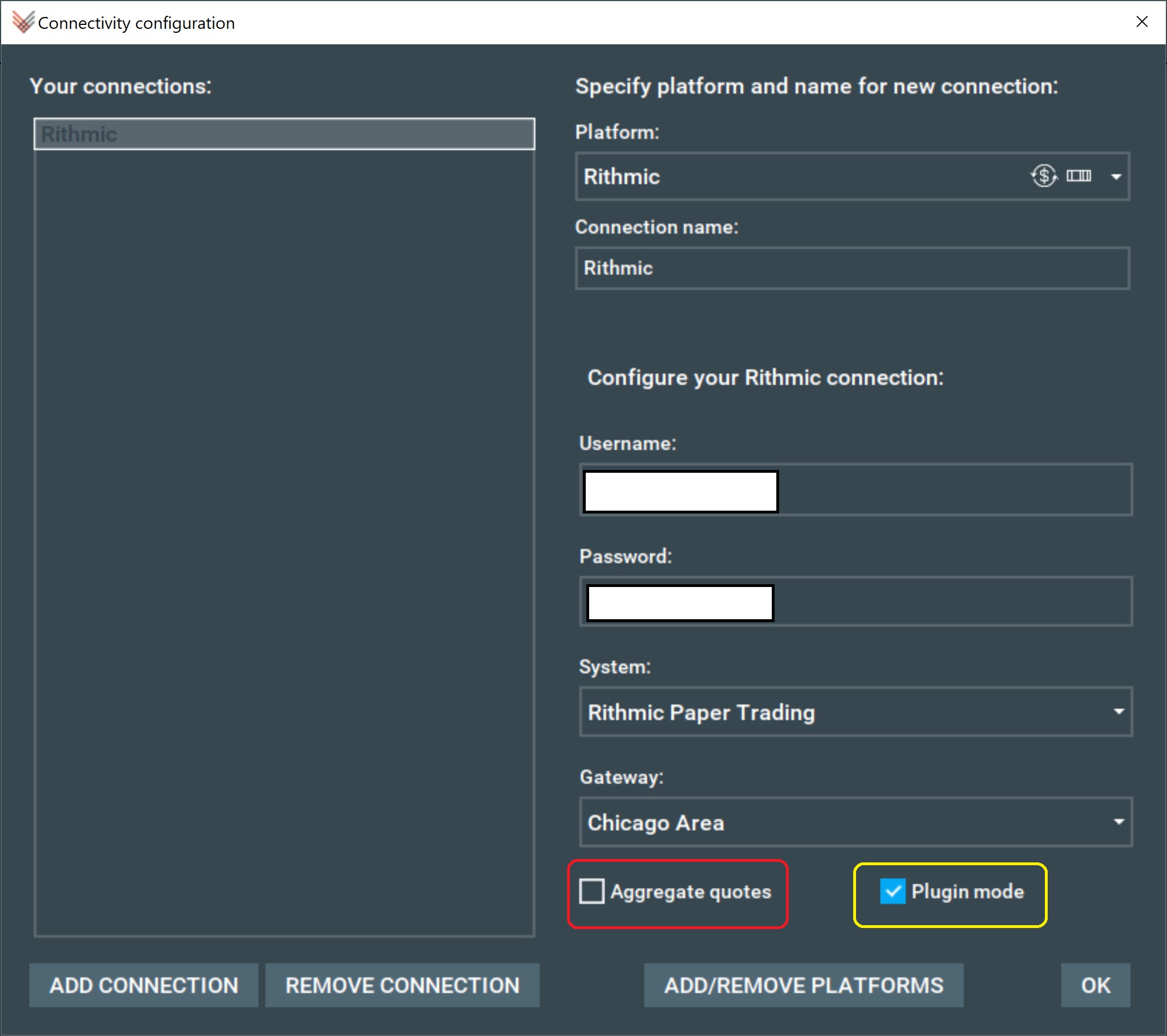
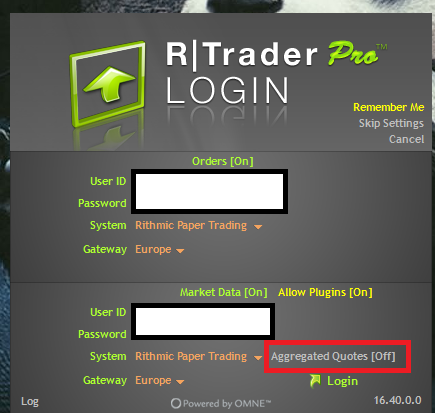
- Remember that the MBO add-ons work with CME MBO market by order data provided by Rithmic. See the screenshots below to learn how to configure Rithmic connectivity:
3. Install the MBO Bundle Indicators
Follow the add-on installation guides to install the indicators.
- Stops & Iceberg Sub-Chart Indicator (SI Sub-Chart)
- Icebergs On-Chart Indicator (Icebergs On-Chart)
- Liquidity Tracker Pro (LT-Pro)
You need to restart Bookmap after purchasing the add-on in order for it to fetch an updated license.
MBO Bundle FAQ
Why doesn’t my Rithmic data work?
1. Make sure you signed the Rithmic agreements. Agreements can be signed in 3 ways:
- Go to rithmic website, log in and sign.
- Try to log in, catch a notification with link ➝ log in ➝ sign.
- Try to log in using R|Trader Pro., it will notify you with pop-up dialog and you will be able to sign all agreements in it.
2. If you did pay for Rithmic but did not receive credentials
If you have not received the email within 20 minutes, please check the spam folder. Otherwise, reach our support team at support@bookmap.com
3. If you cannot connect to Rithmic
- If you subscribed to Rithmic on Bookmap marketplace, make sure that in configuration, you are using System = ‘Rithmic Paper Trading’
- If you are using a Plugin mode, make sure you’re using the same credentials in Bookmap and in R|Trader Pro.
4. If you cannot subscribe to an instrument
- If you have Rithmic via your broker, you may need to contact your broker and ask him to enable the market order data
- Make sure you are using the following format ESU0. For other products, go to the symbols table. To learn what is the current expiry go to CME website
- Make sure you are using the exchange that matches the symbol name for example, if you wish to connect to ES, you have to select ‘CME’ exchange
- If you are using 7.0. you might be missing order book data in your account. 7.1 and above can detect that and show a message, but 7.0 will just stay in ‘subscribing’ state. Contact your broker if that’s the case
- If you still cannot subscribe to an instrument, please reach out support@bookmap.com and attache to the email your email rithmic-engine-log.000 file located in C:\Bookmap\Logs
How do I have Multiple platforms connected to Rithmic?
Watch our brief instructional video to learn how to connect Bookmap via Rithmic's R|Trader Pro API.
I cannot run the MBO bundle. I got a message: This license does not allow using this strategy..."
-
Please make sure that you confirmed the license key in the marketplace
-
Restart Bookmap and see if it repeats
I use Rithmic yet when I tried connecting to the SI Sub-Chart, I got an error message “No CME MBO data messages received. This add-on is working only with CME MBO data”
Make sure that when you configured Rithmic connection in Bookmap, you did not select “Aggregated quotes”
Why my SI Sub-Chart Indicator does not work?
- Make sure you are running Bookmap 7.1 or higher
- Make sure you run the latest version of Stops & Icebergs Sub-Chart Indicator
- Make sure that the ‘Aggregate Quotes’ checkbox is disabled for the Rithmic connection
- Make sure that you haven't set a very high number for the "Min Traded volume" filter under settings (or change it to zero and check again).
I connect my Bookmap through NinjaTrader with RIthmic data but the MBO indicators do not work
MBO indicators cannot work with Rithmic data that goes through Ninja
I can’t run the MBO bundle. I get a message: Strategy <name> can not be loaded to real trading mode
- You need to sign API agreement at https://bookmap.com/strategies-live first
- Sign the API agreement
- Run Bookmap in real trading mode. It is the third option on the launchpad
- Go to Settings > Configure Add-ons
- In the window that shows up click a link which takes you to the API activation page
- Once you are logged in, you will get a form with the agreement text. You need to tick the "I agree" checkbox, click 'Next' and your license will be updated with a live API access