Trading Simulator User Guide
Welcome to the Trading Simulator on Bookmap! This guide will help you get started and outline the rules for trading. The Trading Simulator allows for continuous trading with real-time data, with all your trades being logged in the Bookmap Trading Journal.
💡 Note: The Trading Simulator now runs through the Bookmap Data adapter!
To make setup easier and faster, simulator functionality is now built directly into the Bookmap Data adapter. Because of this transition, the standalone simulator adapter is retired on Bookmap 7.7+.
Follow the Connecting to the Simulator steps below to get started. If you run into any issues, reach out to our Support team.
Trading Simulator Rules
Supported Order Types
Bookmap simulator supports all types of orders:
- Limit Order: This is an instruction to buy or sell a financial asset at a specific price. When you place a buy limit order, it will only execute at or below the specified price. For a sell limit order, it will execute at or above the specified price. This order type allows you to have control over your entry or exit price.
- Market Order: This is an order to buy or sell a financial asset at the current market price. Unlike limit orders, market orders prioritize execution speed over price control. When you place a market order, it will execute immediately at the prevailing market price.
- Stop Limit Order: This is a combination of a stop order and a limit order. It involves two specified prices: a stop price and a limit price (defined by an offset). When the stop price is triggered, the order becomes a limit order to buy or sell at the limit price. It's a tool for managing risk and controlling the maximum price at which you're willing to trade.
- Stop Market Order: This is an order to buy or sell a financial asset once a specified stop price is reached. Unlike the stop limit order, it becomes a market order when the stop price is hit. This means it will execute at the prevailing market price, which might differ from the stop price. Stop market orders are commonly used to limit potential losses or initiate trades at specific price levels.
Supported Operations
- Place an order: enables traders to initiate a position in the financial markets.
- Cancel: allows you to revoke an existing order that you no longer wish to execute. This is useful if you've changed your trading strategy or if market conditions have shifted, and you want to withdraw an order before it's executed.
- Modify price: allows you to adjust the price of an existing order to better align with your trading strategy or adapt to changing market dynamics.
- Modify size: allows you to adjust the size of an existing order.
- Flatten: provides traders with a quick and effective way to exit all open positions and close all open orders in a single action.
Brackets and OCO
You can use Bookmap client side brackets and OCO. To use brackets or OCO, enable it via the checkbox "Brackets" or "OCO" on the TCP Panel.
Reverse
Reverse is supported. You can close your position with the order that is bigger than your position.
Balance
Initial Balance
- 100.000$ (Demo account)
Balance Reset
- If your balance becomes less than 0 or if you are liquidated, your balance will be reset to the initial amount, allowing you to continue trading without interruption.
Order Sum Limitation
- The balance management system in the trading simulator ensures that the total sum of buy and sell orders is limited by the available balance. This means that users cannot place orders that exceed the funds they have in their account.
- Some instruments have enabled leverage orders. It means that users can place more orders using the same available balance. You will pay only X% of the price per contract for such instruments. X - will be defined on a per-instrument basis.
Scale-In Orders
- When users place scale-in orders to increase their position, the system considers the available balance. It allows users to place orders, but the total sum of these orders cannot surpass the available balance.
Position-Based Scale-Out Orders
- Scale-out orders, on the other hand, are limited by both the user's current position and the remaining available balance. Here's how this works:
- Position Limitation: Users can place scale-out sell orders to reduce their position. However, they cannot place sell orders for a quantity greater than their current position, unless there is balance available.
- Balance Limitation: Additionally, the system checks the available balance after each scale-out order. Users can only place sell orders if they have enough available balance to cover any potential buy orders. This prevents users from overextending their position without adequate funds.
User Notifications:
The trading simulator keeps users updated with notifications and warning alerts. If an attempted order exceeds your balance or position limits, you will be warned. This ensures you can always make well-informed decisions.
Trading commissions
The commissions are based on the size of your order and the instrument you are trading. The commission is charged on every execution of the order and subtracted from the account balance.
Supported Instruments
We currently support: CME[ES, MES, NQ and MNQ]
Using Trading Journal
The Bookmap Trading Journal is a powerful tool designed to help you track, analyze, and improve your trading performance. Here's an in-depth look at how to use it effectively:
- Accessing the Trading Journal:
- Navigate to the Trading Journal from the main menu in Bookmap.
- Automatic Trade Logging:
- All trades executed in the 24/7 Simulator are automatically recorded in the Trading Journal.
- The journal captures essential details such as entry and exit prices, trade size, timestamps, and P&L.
- Trade Annotation:
- After each trade, you can add detailed notes and comments.
- Document the rationale behind each trade, the strategy used, and any other relevant information such as market conditions or emotions.
- Performance Metrics:
- The Trading Journal provides various performance metrics to help you evaluate your trading activity.
- Tracked metrics include win rate, average profit/loss, total P&L, and maximum drawdown.
- You can analyze performance over different timeframes (daily, weekly, monthly) to gain deeper insights.
- Visual Analysis:
- Integrate your trade data with Bookmap's heatmap and charting tools to visualize trade entries and exits.
- This visual context can help you understand the market conditions at the time of your trades and refine your strategies.
- Customizable Reports:
- Generate detailed reports on your trading performance.
- Filter and sort trades based on various criteria (e.g., instrument, date, strategy) to focus on specific aspects of your trading.
- Continuous Improvement:
- Regularly review your trades and performance metrics to identify patterns and areas for improvement.
- Use the insights gained from the Trading Journal to adjust and refine your trading strategies.
- Exporting Data:
- Export your trade data to spreadsheets or other software for further analysis.
- This allows you to create custom reports and perform more in-depth analysis if needed.
Connecting to the Simulator
- Download and Install Bookmap:
- Ensure you have the latest version of Bookmap installed. You can download it from here.
- Select Trading Mode:
- Launch Bookmap and select 'trading mode'.
- Connect to Bookmap Data Adapter (version: 0.15.4+)
- Go to Connections -> Configure Menu
- Click on ‘Add Connection’
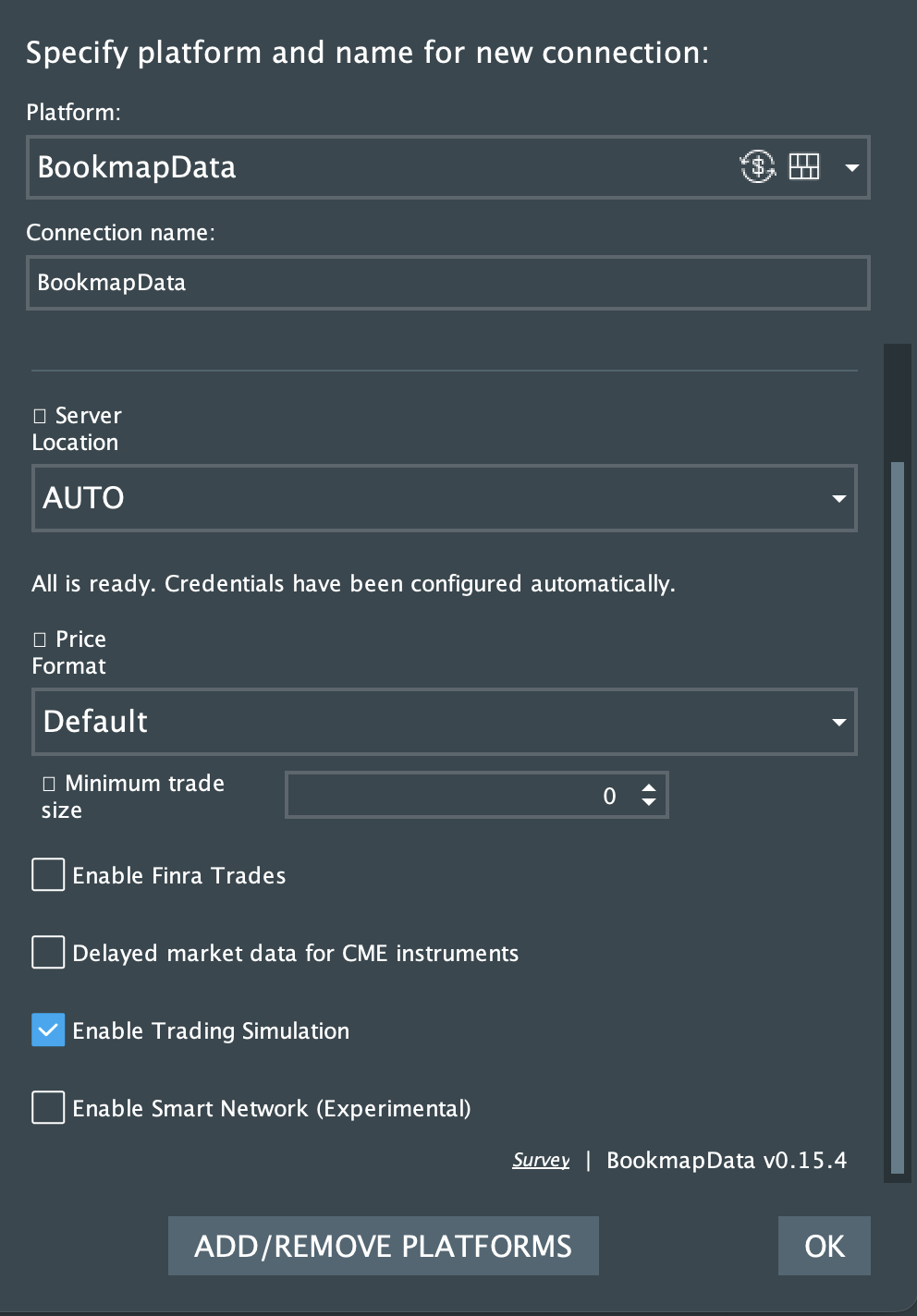
- Add the Bookmap Data from the Platform dropdown. If you can’t find the platform click 'More…' and search for the 'Bookmap Data' in the 'Available to Install' section.
- Click on ‘Add Connection’
- In the Bookmap Data configuration enable the 'Enable Trading Simulation' checkbox:
- Click connect
- Subscribe to one of the supported instruments (ES/MES/NQ/MNQ)
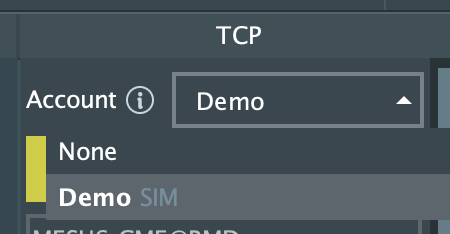
- From the TCP account selector you should be able to select the available account.
- Demo account will be the default simulator account.
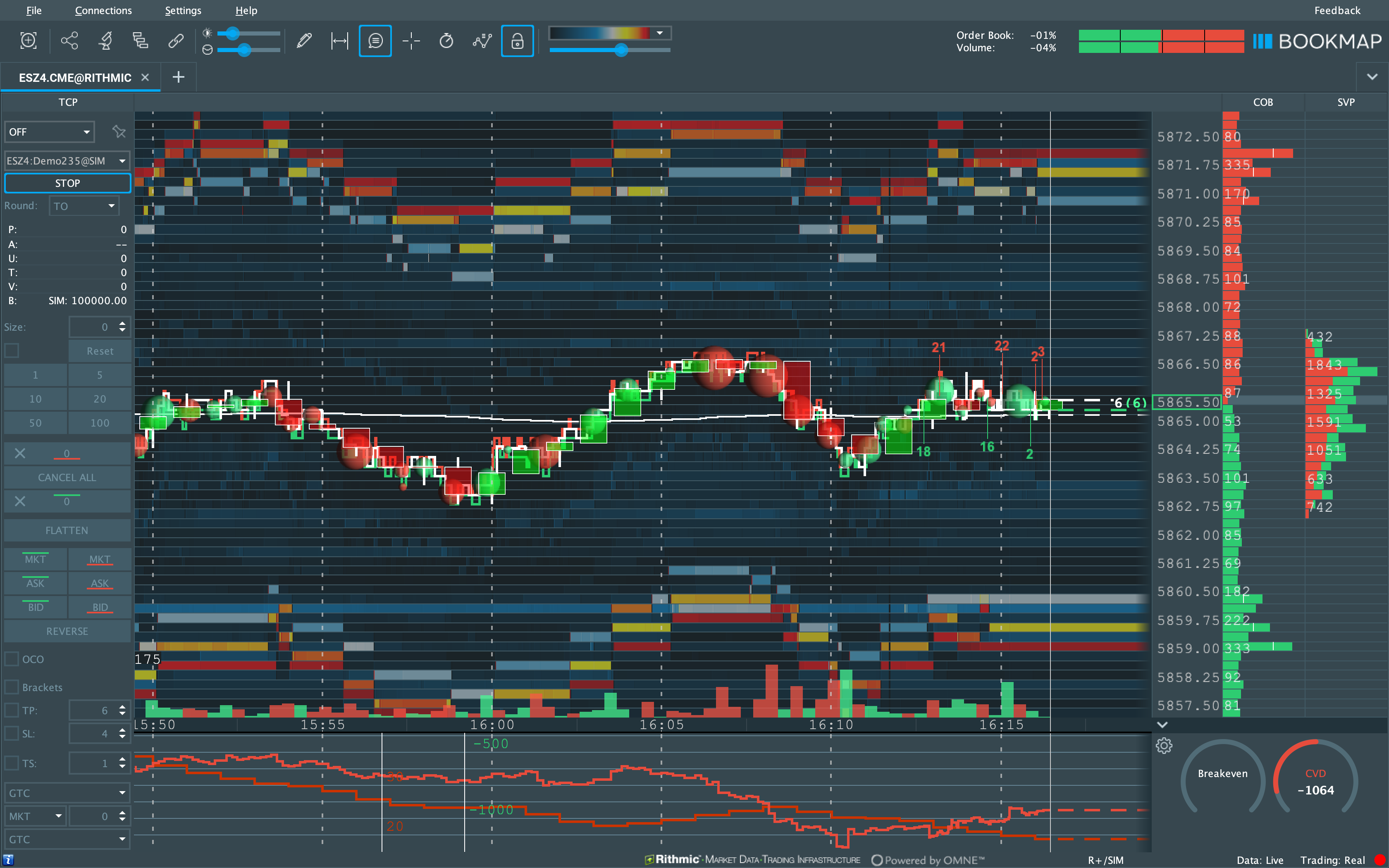
Proper data displaying
If the data in the chart seems off, it could be due to bots.
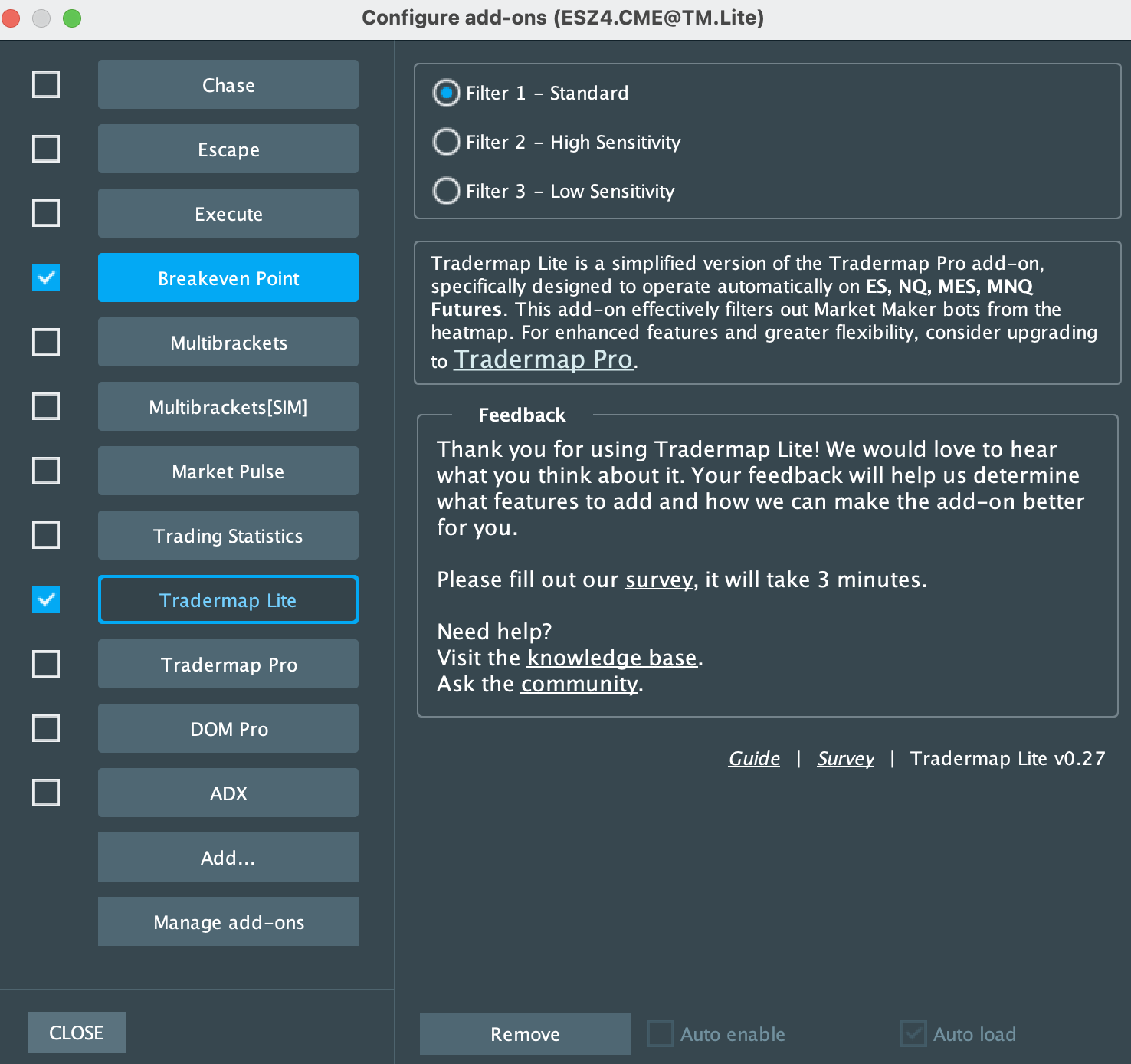
To filter out bots and see accurate data, use the Tradermap Lite add-on.
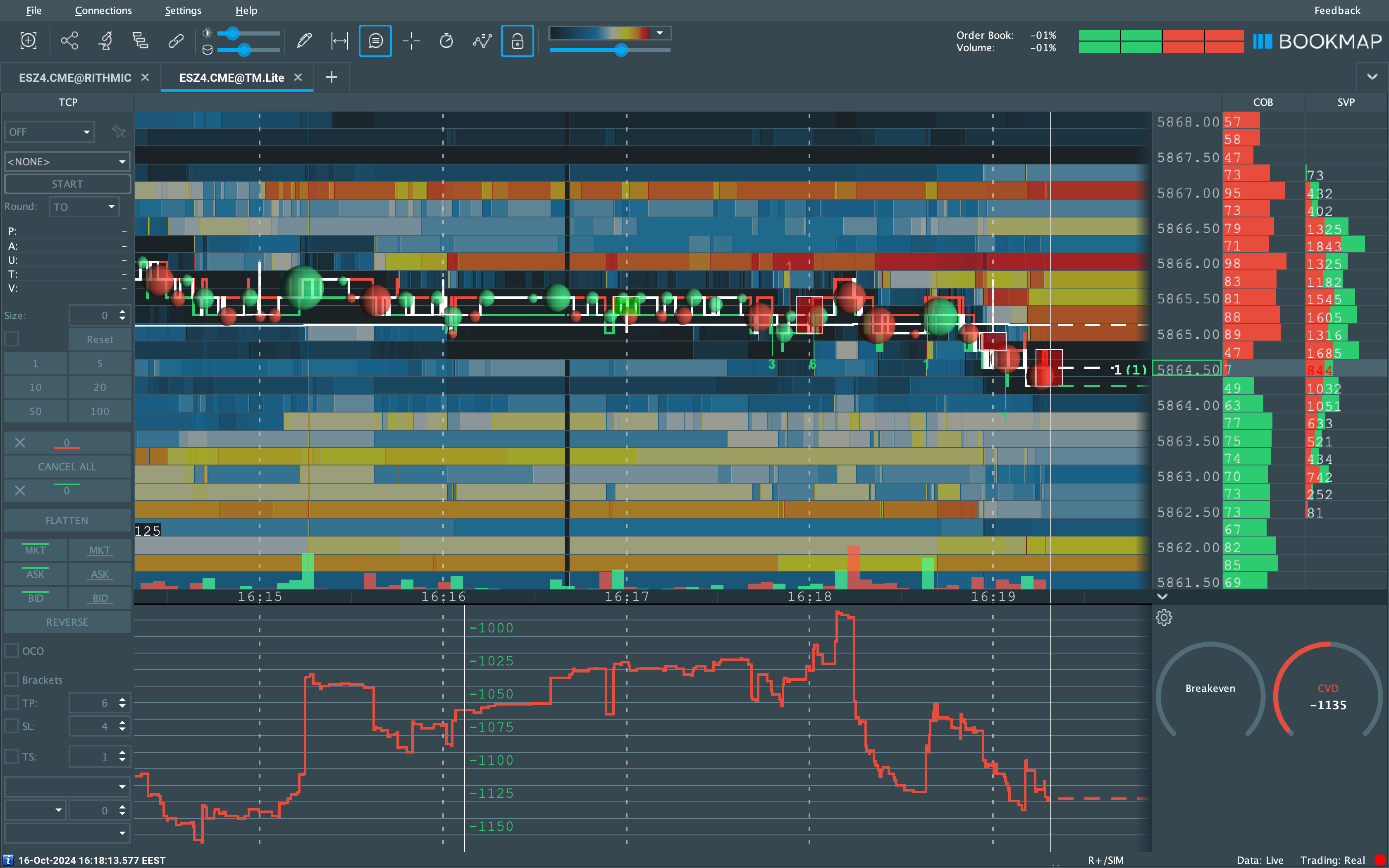
To install, go to the Add-ons Manager and select Tradermap Lite.
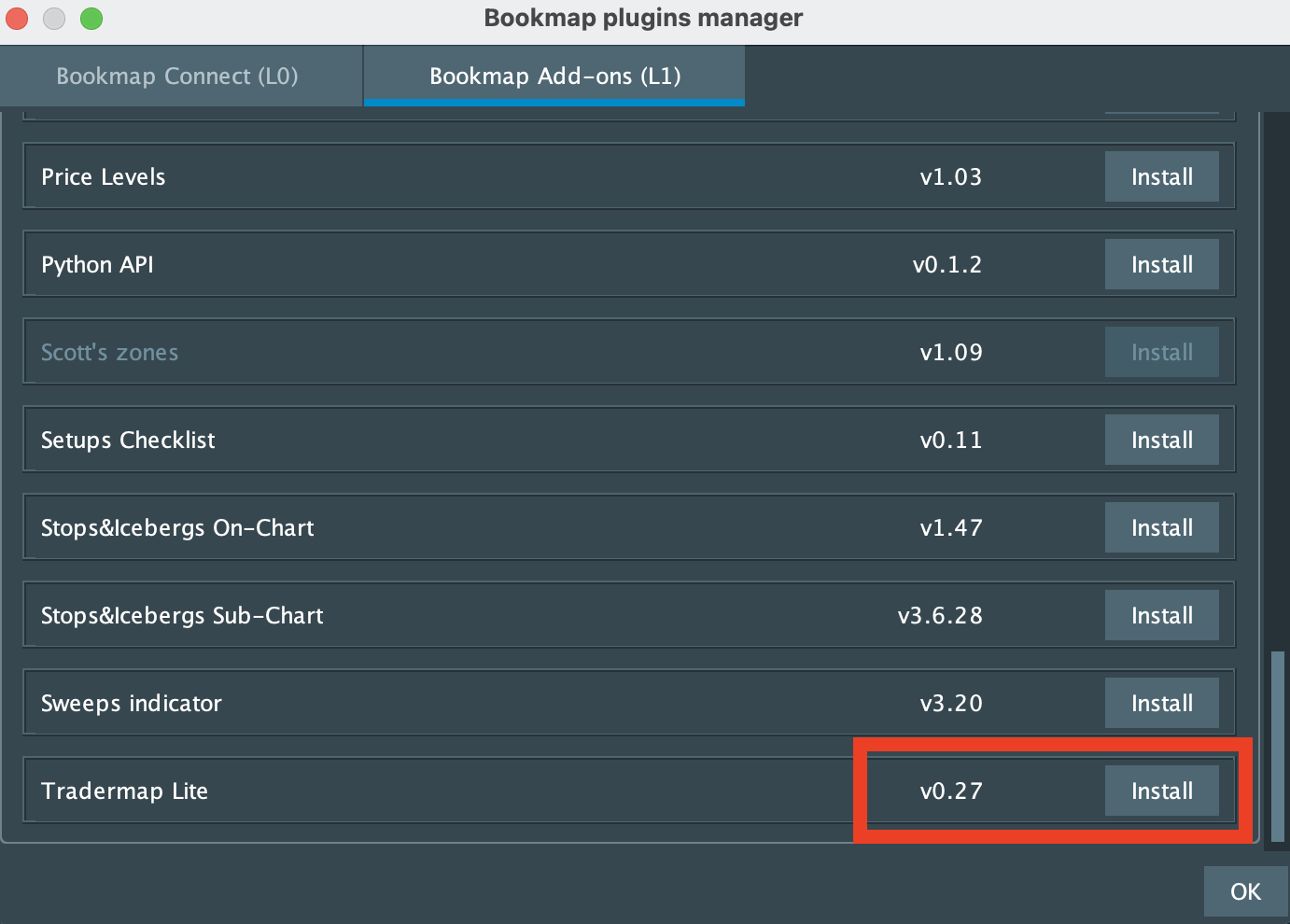
Once installed, activate it in the Add-ons Manager.
Helpful Links
- For more on the Tradermap Lite, refer to the Tradermap Lite Guide.
- For detailed information on connecting to the trading simulator, visit the Trading Simulator Connection Guide.
- For more on the Trading Journal, refer to the Trading Journal Guide.